Beginners usually learn two rules: keep titles under 60 characters, keep descriptions under 155. Both are approximations of a real constraint (pixels), and neither tells you what to write. This article is about the writing, and about how to tell whether a change actually did anything.
What each element actually does
| Element | Where it appears | Ranking impact | Click impact |
|---|---|---|---|
| Title tag | Result headline, browser tab, bookmarks, social previews | Small but real: it is one of many relevance signals | High |
| Meta description | Result snippet, when Google uses it | None directly | High |
That table is the whole strategy in miniature. Spend your effort on the title for relevance, and on the description for persuasion, and do not pretend the description is a ranking lever, because it is not.
Writing title tags
A title tag should do three things: name the topic, distinguish this page from every other page on the site, and give a reason to click. In that order.
Be unique, without exception
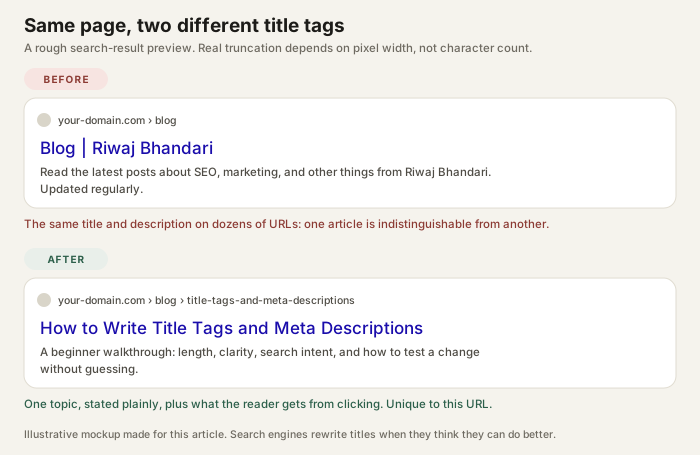
Duplicate titles are the most common on-page problem on small sites, usually because a template hard-codes something like "Blog | Riwaj Bhandari" for every article. Two pages with the same title make the searcher choose blindly and make it harder for a search engine to tell them apart.
Put the specific part first
If the title gets truncated, you want the truncation to hit the brand name, not the topic. Compare:
Riwaj Bhandari | Blog | SEO tips for beginners: the useful part is lastSEO tips for beginners: a practical starting point: the useful part survives
Brand names belong at the end, and only when there is room. On a personal site, your name adds little to a result where the domain is already visible.
Think in pixels, not characters
Google truncates by rendered width. An "i" and a "W" are not the same width, so a 60-character title made of narrow letters may fit while a 52-character title in capitals gets cut. Rough desktop limits are around 580 pixels for the title and 920 for the description, but the only reliable check is to look at a preview tool or the live result.
Do not obsess over exact counts. Aim for "fits comfortably on a phone", which is stricter than desktop, and make sure the first 40 characters carry the meaning.
Write for the query, not for a keyword list
Use the words a searcher would use, once, naturally. A title like "SEO audit | SEO audit services | SEO audit company" is three repetitions of the same idea and reads like spam. The reader learns nothing about what makes your page different.
Writing meta descriptions
A description is a two-sentence pitch written for one person who has just seen your title. It should say what the page contains and what the reader will be able to do afterwards.
- Do not repeat the title. You have about 155 characters; spending 40 of them restating the headline is waste.
- Match the page. A description that oversells produces a bounce, and a bounce is a worse outcome than a lower click-through.
- Include the specific. "Eight checks, in order" is more credible than "everything you need to know".
- Skip the call to action clichés. "Click here to learn more" describes every page on the internet.
Descriptions are also optional in the sense that Google may ignore them entirely and pull text from the page. That is not a reason to leave them empty. A written description is still used often enough to be worth the two minutes.
Why Google rewrites both
Google frequently replaces the title with a heading or other on-page text, and often builds the snippet from body content. It does this when it thinks another line better matches the query. You cannot prevent it, but you can make it less likely:
- Keep the title consistent with the H1 and the page's actual content.
- Avoid titles that are just a brand name plus a generic phrase.
- Do not stuff the title with words the page does not deliver on.
If you see a rewrite in the wild, treat it as feedback: something on the page described it better than your title did.
A repeatable process
- Write the H1 first. It is the plainest statement of the page topic. The title is a variation of it, not a different idea.
- Add the differentiator. What does this page offer that a competing result does not: a checklist, a template, a worked example, a comparison?
- Trim to fit. Cut adjectives first, then the brand, then anything the reader already knows.
- Write the description as a summary. Two sentences: what is here, and what the reader gets.
- Read both out loud. If you would not say it to a colleague, rewrite it.
| Weak title | Problem | Better direction |
|---|---|---|
| Home | Says nothing about the topic or the person | Name the discipline and the role |
| SEO Tips - Best SEO Tips 2026 | Repeats the keyword, promises everything | Name the specific audience or problem |
| My Blog Post | No topic, no reason to click | State the task the post performs |
| Services | Company Name | City | Generic, interchangeable with competitors | Say what the service actually involves |
How to test a change honestly
If you edit a title and impressions or clicks move, you have not proven anything yet. Search results fluctuate, seasonality exists, and a competitor may have changed their page on the same day. A defensible test looks like this:
- Change one element at a time: title or description, not both.
- Record impressions, clicks and average position for the URL before the change, over a fixed window.
- Wait long enough to see a stable pattern. Days are usually too short.
- Compare against a page you did not touch, if you have one.
- Write down what happened, including "no measurable difference".
Impression and click data only exist once the page is published and verified in a search console. On a local copy you can review the writing, but you cannot measure results.
Next steps
Take one page you own and rewrite its title and description using the process above. Then run the rest of the on-page checklist so the page actually delivers what the new title promises.
If the page is not being found at all, the problem is upstream: start with the technical audit instead.