Most beginner audits fail for the same reason: they start with a tool and end with a spreadsheet nobody acts on. A better approach is to start with a question, gather only the evidence you need to answer it, then fix the two or three things that matter and prove they changed.
The scope here is deliberately modest: a site with tens or low hundreds of URLs. If you are auditing something with tens of thousands of pages, the same logic applies but you will need sampling and proper crawling infrastructure.
What a technical audit is actually answering
Five questions, in order of consequence:
- Can a crawler reach the page? Is it linked, is it allowed by robots.txt, does it return a valid status code?
- Is the page indexable? No
noindex, no conflicting canonical, no accidental duplicate. - Does the page render? Is the main content present after JavaScript runs, and present in the HTML a crawler first receives?
- Is the page fast and stable enough to use? Core Web Vitals, layout shift, mobile usability.
- Is anything telling search engines contradictory things? Canonicals, sitemaps, hreflang, redirect chains.
Everything else, such as meta descriptions, heading order and keyword placement, is on-page work. Do it after this, not before.
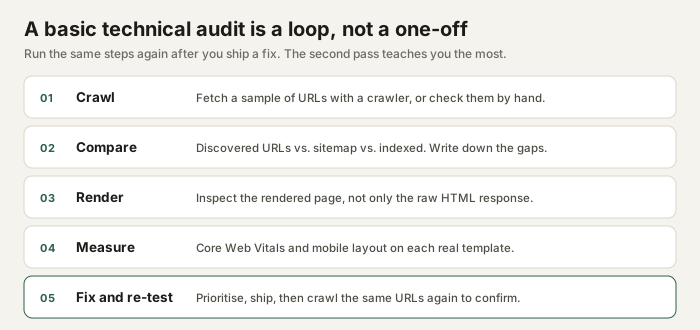
Stage 1: build an honest URL list
You cannot audit pages you do not know about. Collect URLs from three sources and compare them, because each one lies slightly differently:
- Your XML sitemap. This is what you want indexed. It is a declaration, not a guarantee.
- A crawl of the site. Start at the homepage and follow links. This is what a crawler can actually discover by following the structure you built.
- Server logs or Search Console data. This is what was actually requested or seen. Logs are the ground truth if you can get them.
Any URL in the sitemap that the crawl never found is either orphaned (no internal links) or blocked. Both are worth knowing about. Any URL the crawl found but the sitemap omits is either an oversight or intentionally excluded. Decide which, and write it down.
The sitemap at /sitemap.xml lists nine indexable URLs. The custom 404 page
is deliberately excluded. If a new article is added and the sitemap is not updated, the
crawl will still find it through the blog index, but the mismatch is a signal that the
site needs maintenance.
Stage 2: compare discovered with indexed
Being crawlable is not the same as being indexed. A URL can be discovered, fetched, and
still excluded: because it is a duplicate, because it is thin, or because someone added a
noindex.
Google Search Console's Pages report is the only reliable source for this on your own site.
The site: search operator is a rough indicator at best: it is not a complete
index, it varies between users, and it changes daily. Use it to sanity-check, never to
conclude.
| Status | Likely cause | First thing to check |
|---|---|---|
| Discovered - currently not indexed | Known but not crawled yet, or judged low value | Internal links, content uniqueness, site size |
| Crawled - currently not indexed | Fetched but not selected for the index | Thin or duplicated content, intent mismatch |
| Excluded by noindex | Deliberate or accidental directive | meta robots, X-Robots-Tag |
| Duplicate, Google chose different canonical | Conflicting canonical signals | Self-referencing canonical, internal links, sitemap |
| Redirect error | Chain or loop | Each hop in the chain, one at a time |
Stage 3: check what actually renders
"View source" shows the HTML the server sent. "Inspect" shows the DOM after JavaScript has run. They are not the same document, and for some sites the difference is the whole page.
For each key template, confirm that the main content, the title, and the canonical tag are present in the initial HTML. If they only appear after JavaScript executes, you are relying on the search engine to render the page, which it can do, but with delay and no guarantee.
- Turn JavaScript off and reload. What is still readable?
- Compare the rendered DOM with the raw response.
- Check that links are real
<a href>elements, not click handlers on divs.
Stage 4: status codes, canonicals and directives
This is the part that rewards patience. Read the actual response for a sample of URLs and check that every signal agrees.
| Signal | What "correct" looks like | Common mistake |
|---|---|---|
| Status code | 200 for real pages, 301 for permanent moves, 404 for genuinely missing | Soft 404s that return 200 with "not found" text |
| Canonical | One self-referencing absolute URL per indexable page | Pointing every page at the homepage |
| robots meta | Absent, or index, follow where appropriate |
Staging noindex left in production |
| robots.txt | Allows pages you want indexed, references the sitemap | Using it to "hide" content, which it does not do |
| Redirects | Single hop, pointing at a live 200 URL | Chains of three or four hops after a site migration |
| Sitemap | Only canonical, indexable, 200-status URLs | Listing redirects, 404s, or noindexed pages |
A Disallow rule asks well-behaved crawlers not to fetch a URL. It does not
protect private data, and a blocked URL can still be indexed if other pages link to it.
Use authentication for anything that must stay private.
Stage 5: performance and mobile behaviour
Test the templates, not the homepage only. A heavy hero image on an article template will not show up if you only ever measure the homepage.
- Run Lighthouse on a representative page at mobile settings.
- Run PageSpeed Insights and note the difference between lab and field data. Field data comes from real visitors and may be unavailable for low-traffic sites.
- Check the largest contentful image: is it compressed, correctly sized, and not lazy-loaded above the fold?
- Throttle the network and watch for layout shift as fonts and images arrive.
- Test at 360 px width and with the keyboard only.
Record the numbers with the date and the device profile. A score without context is not a measurement, it is a screenshot.
Prioritising what you found
Sort by damage first, effort second. A simple two-by-two is enough:
| Priority | Examples | Why first |
|---|---|---|
| 1. Blocking | Accidental noindex, robots.txt blocking the whole site, 5xx errors |
Nothing else matters until pages can be reached |
| 2. Structural | Wrong canonicals, redirect chains, orphaned pages | They corrupt every other signal you send |
| 3. Performance | Oversized images, render-blocking scripts, layout shift | Affects every page, but usually not fatally |
| 4. Polish | Title rewrites, description improvements, alt text | Valuable, but never worth doing on a broken page |
Fix one category at a time, then re-crawl the same URLs. Re-testing the same sample is what turns an audit into evidence.
Three things not to conclude
- "The sitemap guarantees indexing." It does not. A sitemap is a hint that helps discovery. Indexing is a separate decision.
- "robots.txt keeps pages out of search." It prevents fetching, not necessarily indexing, and it is public.
- "A 100 Lighthouse score means good SEO." Lighthouse measures page experience signals. It says nothing about relevance, intent or content quality.
Next steps
- Crawl your site and export the URL list. Save it with today's date.
- Answer the five questions for one template at a time.
- Write the issues down with evidence: URL, what you saw, what you expected.
- Fix priority 1 and 2 items, then re-run stage one and compare.
The practice case study shows this loop applied to a test site, including the parts where I was wrong. For the page-level version, use the on-page checklist.