On-page SEO is the part of optimization you can change inside a single page: the title, the headings, the words, the links pointing elsewhere on your site, the images, and the canonical tag. It is not a magic ranking switch. It is the difference between a page that explains itself clearly and a page that makes both readers and crawlers guess.
This checklist assumes you are working on one URL at a time. If you are auditing a whole
site, do the technical pass first. There is no point perfecting titles on pages that
cannot be crawled or are set to noindex.
What on-page SEO actually covers
Before the checklist, it helps to know what is in scope. On-page work covers everything that lives in the HTML of one URL and its immediate presentation:
- the title tag and meta description
- the heading hierarchy, starting with one H1
- the body content: structure, depth, clarity, examples
- internal links out of the page, and anchor text pointing into it
- images: file names, alt text, dimensions, loading behaviour
- the URL slug and the canonical tag
It does not cover backlinks, server response times, crawl budget or whether Google has chosen to index the page. Those are separate problems, and mixing them into an on-page review is how audits turn into vague lists of complaints.
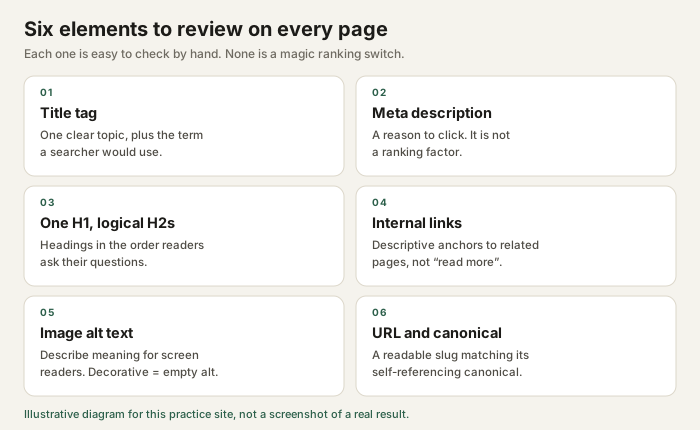
Step 0: confirm the search intent first
Every other check is pointless if the page targets the wrong intent. Take the query the page is meant to answer and search it. Look at what actually ranks, and note the format:
| Query shape | Likely intent | Page that tends to fit |
|---|---|---|
| "what is a canonical tag" | Informational | Explainer with a definition near the top |
| "canonical tag checker" | Tool-seeking | A working tool, not an essay about tools |
| "seo audit services" | Commercial | Service page with scope, process and pricing |
| "screaming frog vs sitebulb" | Comparison | Side-by-side comparison with a clear verdict |
If your page is an essay and the results are all tools, you are fighting the format. Fix that before you touch a title tag. More on this in the technical SEO audit walkthrough when you get to the site-wide version of the same question.
The eight checks
Work through these in order. Each one is small enough to finish, which matters: an audit you can complete is more useful than a perfect one you abandon.
1. Title tag
The title is the clickable headline in a result. It should name the topic plainly and be unique across the site. Two pages with the same title compete with each other and tell the reader nothing.
Character counts are a rough guide, not a rule. Google truncates by pixel width, so a title full of narrow letters can survive at 65 characters while one full of wide capitals gets cut at 50. Aim for roughly 50 to 60 characters, front-load the specific part, and check the rendered result rather than counting in your head. The title and description guide goes deeper on this.
2. Meta description
The description does not directly affect ranking. It affects whether someone clicks. Write it as a short, honest summary of what the page delivers, and keep it unique. Leaving it empty means Google will generate one from page text, which is often worse than a sentence you wrote on purpose.
3. Heading structure
One H1 that states the page topic, then H2s for the main sections, then H3s inside them. Do not skip levels to get a smaller font size. That is what CSS is for. Headings are also a navigation aid for screen reader users, who can jump between them.
A quick test: read only the headings, top to bottom. They should form a coherent outline of the page. If they read like a list of keyword variations, rewrite them.
4. Body content
- Answer the main question in the first few paragraphs, not at the end.
- Prefer specifics such as a number, a threshold or an example over adjectives.
- Cut sentences that only restate the heading.
- Use lists and tables where the content is genuinely enumerable.
- Check that every claim you make can survive someone asking "how do you know?"
5. Internal links
Link to the pages a reader would sensibly want next, using anchor text that describes the destination. "Read more" wastes the opportunity; "how to run a basic technical SEO audit" tells the reader and the crawler what is on the other side.
Two to five contextual links in a normal article is plenty. Also check the reverse direction: does any other page link here? A page with no internal links pointing to it is hard to discover.
6. Images
Every meaningful image needs alt text that conveys its content, not its file name. Purely
decorative images should have an empty alt="" so screen readers skip them.
Always set width and height attributes so the browser reserves
space and the page does not jump while loading.
7. URL and canonical
A readable slug such as /blog/on-page-seo-checklist/ rather than
/p?id=1842 helps people and gives you a stable thing to link to. Every
indexable page should carry a canonical tag pointing at its own preferred URL. If the
canonical points somewhere else, you are telling Google this page is a duplicate.
8. Log it before you change it
Write down the current state before editing: the title, the description, the word count, the number of internal links, the date. Without a record you cannot tell whether your change helped or whether the page simply fluctuated, which search results do constantly.
A reusable checklist table
Copy this into a spreadsheet and use one row per URL. The "where to look" column keeps the audit honest, because you have to point at evidence rather than a feeling.
| Check | Pass criteria | Where to look |
|---|---|---|
| Intent | Page format matches what ranks for the query | Search the query, note the dominant format |
| Title | Unique, specific, roughly 50 to 60 characters | <title> in the page source |
| Description | Unique, accurate, roughly 120 to 155 characters | meta name="description" |
| Headings | One H1, no skipped levels, outline reads logically | Headings-only outline view |
| Internal links | 2 to 5 contextual links with descriptive anchors | Page body; check inbound links too |
| Images | Meaningful alt text, empty alt when decorative, dimensions set | <img> tags |
| URL | Short, readable, stable | Address bar |
| Canonical | Self-referencing absolute URL | link rel="canonical" |
What on-page SEO will not do
It is worth being blunt about the limits, because beginner advice often is not:
- It does not guarantee ranking. A well-optimized page can still lose to a better page, a stronger site, or a result format the searcher prefers.
- It cannot fix a slow or broken site. If pages time out or render empty, start with technical SEO.
- Meta descriptions are not a ranking factor. They influence clicks, and clicks are not the same thing as position.
- Keyword repetition is not optimization. Using a phrase eleven times does not make the page more relevant; it makes it worse to read.
Every page here follows this checklist. Open a page, view the source, and compare it against the table above. The projects page documents what happened when I applied the same review to this website.
Next steps
- Pick one URL you own and run all eight checks. Log the current state first.
- Fix the two biggest problems only. Resist rewriting everything at once.
- Wait, then re-check the page and write down what changed, including "nothing".
- Repeat on the next URL. Ten pages in, the process becomes fast.
When you are comfortable with this, move to the technical audit walkthrough and then to writing title tags and descriptions in more depth.